- Học kỳ
- SP2026
- Thời Gian
- 5/5/26
- Loại tài liệu
- PE
APO201c SP26 PE
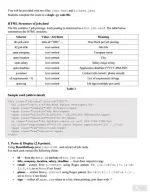
You will be provided with two files: jobs. html and filters. json
Students complete the exam in a single .py code file.
HTML Structure of jobs.html
The file contains 5 job postings. Each posting is structured as a div. job-card. The table below
summarises the HTML structure.
Selector
Value / Attribute
Meaning
div.job-card
data-id="J001" ...
One block per job posting
h2.job-title
text content
Job title
span.company
text content
Company name
span.location
text content
City
span.salary
text content
Salary range string
span.deadline
text content
Application deadline (YYYY-MM-DD)
p.contact
text content
Contact info (email / phone mixed)
ul.requirements > li
text content
List of requirement strings
span.tag
text content
Job tags (multiple per card)
Table 1
Sample card (abbreviated)
<div class="job-card" data-id="J001">
<h2 class="job-title">Backend Python Developer</h2>
<span class-"company">FPT Software</span>
<span class="location">Ha Noi</span>
<span class="salary">18, 000, 000 - 28, 000,000 VND/month</span>
Sspan class-"deadline">2024-05-30</span>
<p class-"contact">[email protected] or call 024.7300.7300</p>
<ul class-"requirements"><li>3+ years Python experience</li> ...< /ul>
<span class-"tag">Full-time</span>
<span class="tag">On-site</span>
</div>
1. Parse & Display (2.0 points):
Using BeautifulSoup parse jobs. html and extract all job cards.
For each card, extract the following fields:
id-from the data-id attribute of div. job-card
.
. title, company, location, salary, deadline - from their respective tags
. email- extract from p.contact using Regex pattern. Ex: [\w.]+@[\w.]+\. [a-zA-
Z] {2,4]; set to None if not found
. phone -extract from p.contact using Regex pattern. Ex:\d(3,4) [.\-]\d[\d.\-]+ ;
set to None if not found
. tags-collect all span. tag values as a list; when printing, join them with '/'
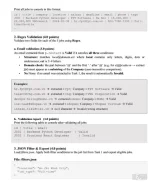
Print all jobs to console in this format:
id | title | company | location | salary | deadline | email | phone | tags
J001 | Backend Python Developer | FPT Software | Ha Noi | 18,000,000 -
28,000,000 VND/month | 2024-05-30 | [email protected] | 024.7300.7300 | Full-
time/On-site
2. Regex Validation (4.0 points)
Validate two fields for each of the 5 jobs using Regex.
a. Email validation (3.0 points)
An cmail extracted from p. contact is Valid if it satisfies all three conditions:
. Structure: matches [email protected] where local contains only letters, digits, dots or
underscores; ext is 2-4 letters.
. Domain check: the part between *@' and the first *,' after *@' (e.g. for [email protected] -+ extract
fpr) must appear as a substring of the Company (case-insensitive comparison).
. No None: if no email was extracted in Task 1, the result is automatically Invalid.
Examples:
[email protected] > extracted=fpt; Company= FPT Software - Valid
[email protected] - extracted = vng; Company = VNG Corporation Valid
[email protected] - extracted = momo; Company = MoMo - Valid
[email protected] - extracted = shopee; Company = Shopee Vietnam > Valid
intern.tiki#tiki.vn -> no @ character - Invalid (wrong structure)
b. Validation report (1.0 points)
Print the following table to console after validating all jobs:
id | title | email
J001 | Backend Python Developer | Valid
J002 | Frontend React Engineer
| Invalid
...
3. JSON Filter & Export (4.0 points)
Load filters.json. Apply both filter conditions to the job list from Task 1 and export eligible jobs.
File: filters.json
-
"location": "Ho Chi Minh City",
"job_typo": "Full-timo"
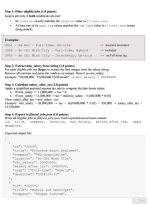
Step 1: Filter eligible jobs (1.0 points)
Keep a job only if both conditions are met:
. Its location exactly matches the location value in filters.json
. At least one of its span. tag values matches the job_type value in filters. json (exact
string match)
Examples:
J001 - Ha Noi - Full-time, On-site
-> location mismatch
J002 - Ho Chi Minh City - Full-time, Hybrid
-> included
J003 - Ho Chi Minh City - Internship, On-site
-> no Full-time tag
Step 2: Extract min_salary from string (1.0 points)
For cach eligible job, use Regex to extract the first integer from the salary string.
Remove all commas and parse the result as an integer. Store it as min_salary.
Example: "20,000,000 - 35,000,000 VND/month" - min_salary = 20000000
Step 3: Calculate salary_after_tax (1.0 points)
Apply a simplified personal income tax rule to compute the take-home salary:
. If min_salary <= 11,000,000 -+ tax = 0
If min_salary> 11,000,000 -+ tax = int((min_salary - 11,000,000) * 0.05)
Then: salary_after_tax - min_salary - tax
Example: min_salary - 20,000,000 -+ tax - int(9,000,000 * 0.05) - 450,000 -> salary_after_tax -
19,550,000
Step 4: Export to filtered_jobs.json (1.0 points)
Write all eligible jobs to filtered jobs.json. Each exported record must contain:
id, title, company, location, min_salary, salary_after_tax, tags,
deadline.
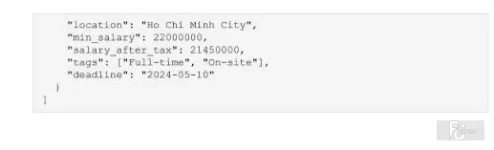
Expected output file:
-
"id": "J002",
"title": "Frontend React Engineer",
"company": "VNG Corporation",
"location": "Ho Chi Minh City",
"min salary": 20000000,
"salary_after_tax": 19550000,
"tags": ["Full-time", "Hybrid"],
"deadline": "2024-06-15"
"id": "J005",
"title": "Mobile 10S Developer",
"company": "Shopee Vietnam",