- Học kỳ
- SP2026
- Thời Gian
- 4/5/26
- Loại tài liệu
- PE
- Mã Đề
- WED201c_PE_2_SP26_162873
WED201c SP26 NO1 PE RE
Test PE_2
Spring 2026
Subject: WED201c
Duration: 120 minutes
Objectives:
Create a style sheet and link it to the html file.
Background:
In this practice exam, you are given a folder "Resource". You are going to use page "index.html" to
finish the exam.
-
The Student is allowed to add classes or ids to the html tags in the index.html page.
-
After completing the final exam, The student will submit the Resource folder to the Server.
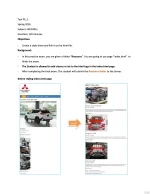
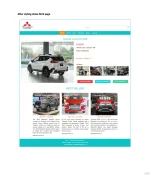
Before styling index.html page
Required:
Create a file called styleindex.css to format the index.html page and save it to the Resource/css
folder.
Evaluation :
o The student is not allowed to change images and content in the index.html page. If
violated, the exam result will be 0.
o If student embed css in the wrong path, the exam result will be 0.
A. HTML [0.5 points]
Embed the styleindex.css file in the head tag of the index.html page [0.5 points].
B. CSS [9.5 points]
-
Use a 12-column grid system to format web page content [1 point].
Use margin and padding to create the right spacing for the contents [1 point].
- Use css to format the logo and search as shown above [ 1 point].
-
Use css to format the menu as shown above [ 0.5 points].
-
Use css to format for 2 titles: "Xpander Cross MT 2026" and "BEST SELLER" [ 0.5 points].
-
Use css to format the content of title "Xpander Cross MT 2026" [ 2.5 points].
Format for the images [ 1 point].
Format for the text and Border [ 1 point].
Format for the 3 buttons [0.5 points].
Use css to format the content of title "BEST SELLER" [ 1.5 points].
Format for the images [ 0.5 points].
Format for the text describing the car name [ 0.5 points].
0
Format for the text describing the car [0.5 points].
-
Use css to format the content "footer" [0.5 points].
-
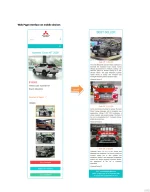
Use css to format website content on mobile devices [ 1 point].
The End